Old Mutual

Finance

Our team was brought in by Old Mutual, the oldest financial institution in South Africa, with the goal of transforming their digital experience, introducing a fresh visual identity, and improving the user experience.

Client

Old Mutual

Services

Visual Design UI & UX Design Interaction Design

Industries

Fintech

Date

2018 -2019

One of our key focuses was redesigning the asset management app, which was a critical component of their digital experience. The app is a central hub for Old Mutual customers to manage their accounts, conduct financial transactions, and explore other features like viewing their spending patterns, watching financial explainer videos, and opening new accounts. To meet the goals of Old Mutual, we conducted extensive research on user needs, preferences, and behaviors to understand what features were most important to them. We also reviewed industry trends, competitive analysis, and best practices to identify key areas where we could improve the app's design and functionality. To create a more engaging user experience, I put a significant focus on developing micro-interaction animations that guide the user while using the app. These animations help to provide context and direction, making the user experience more intuitive and streamlined.

The New Homepage

To make the experience more personalised, I start with a warm greeting that addresses the podcasters name. I then provide an option to continue recording their last podcast or switch to a different one, giving users the flexibility to work on multiple podcasts at once.


One of the new features that I have introduced, is the ability to schedule recording sessions for a future date and invite others to join. This helps users plan their podcast recording in advance and collaborate with other podcasters seamlessly.

To onboard new podcasters, I have included a section where users can access tips and tricks to improve their podcasting skills. This helps users get started on their podcasting journey with ease and sets them up for success.


To restructure the information architecture, I have removed the bottom navigation bar and brought the analytics and profile to the top. This makes it easier for users to access their most important information quickly. Additionally, I have introduced a strong floating call to action to "start a new podcast," encouraging users to take the first step in creating their own podcast.

Overall, these changes create a more personalized and user-friendly experience that encourages users to engage more deeply with the platform.

The New Homepage

To make the experience more personalised, I start with a warm greeting that addresses the podcasters name. I then provide an option to continue recording their last podcast or switch to a different one, giving users the flexibility to work on multiple podcasts at once.


One of the new features that I have introduced, is the ability to schedule recording sessions for a future date and invite others to join. This helps users plan their podcast recording in advance and collaborate with other podcasters seamlessly.

To onboard new podcasters, I have included a section where users can access tips and tricks to improve their podcasting skills. This helps users get started on their podcasting journey with ease and sets them up for success.


To restructure the information architecture, I have removed the bottom navigation bar and brought the analytics and profile to the top. This makes it easier for users to access their most important information quickly. Additionally, I have introduced a strong floating call to action to "start a new podcast," encouraging users to take the first step in creating their own podcast.

Overall, these changes create a more personalized and user-friendly experience that encourages users to engage more deeply with the platform.

The New Homepage

To make the experience more personalised, I start with a warm greeting that addresses the podcasters name. I then provide an option to continue recording their last podcast or switch to a different one, giving users the flexibility to work on multiple podcasts at once.


One of the new features that I have introduced, is the ability to schedule recording sessions for a future date and invite others to join. This helps users plan their podcast recording in advance and collaborate with other podcasters seamlessly.

To onboard new podcasters, I have included a section where users can access tips and tricks to improve their podcasting skills. This helps users get started on their podcasting journey with ease and sets them up for success.


To restructure the information architecture, I have removed the bottom navigation bar and brought the analytics and profile to the top. This makes it easier for users to access their most important information quickly. Additionally, I have introduced a strong floating call to action to "start a new podcast," encouraging users to take the first step in creating their own podcast.

Overall, these changes create a more personalized and user-friendly experience that encourages users to engage more deeply with the platform.

The Recording Experience

The Recording Experience

The Recording Experience

To make the recording process more streamlined, I introduced a concise action bar that contains the essential tools in one place, making it easier for users to have seemless recording experience.


The action bar includes the following actions: invite, Q&A, notes, interludes, and start recording. The "invite" and "interludes" options remain the same, allowing users to invite guests and add interludes to their podcast. However, with the "notes" option, users can now either create show notes or import them from other note apps, making it easier for users to prepare their notes before recording.


The "Q&A" feature allows users to facilitate a question and answer session within the recording screen. This feature helps hosts to directly engage with their audience and guests, making the podcast more interactive and engaging.

The Magic of AI

The Magic of AI

The Magic of AI

To make the recording and editing experience truly revolutionary, we can leverage the power of artificial intelligence (AI) to enhance the user experience.

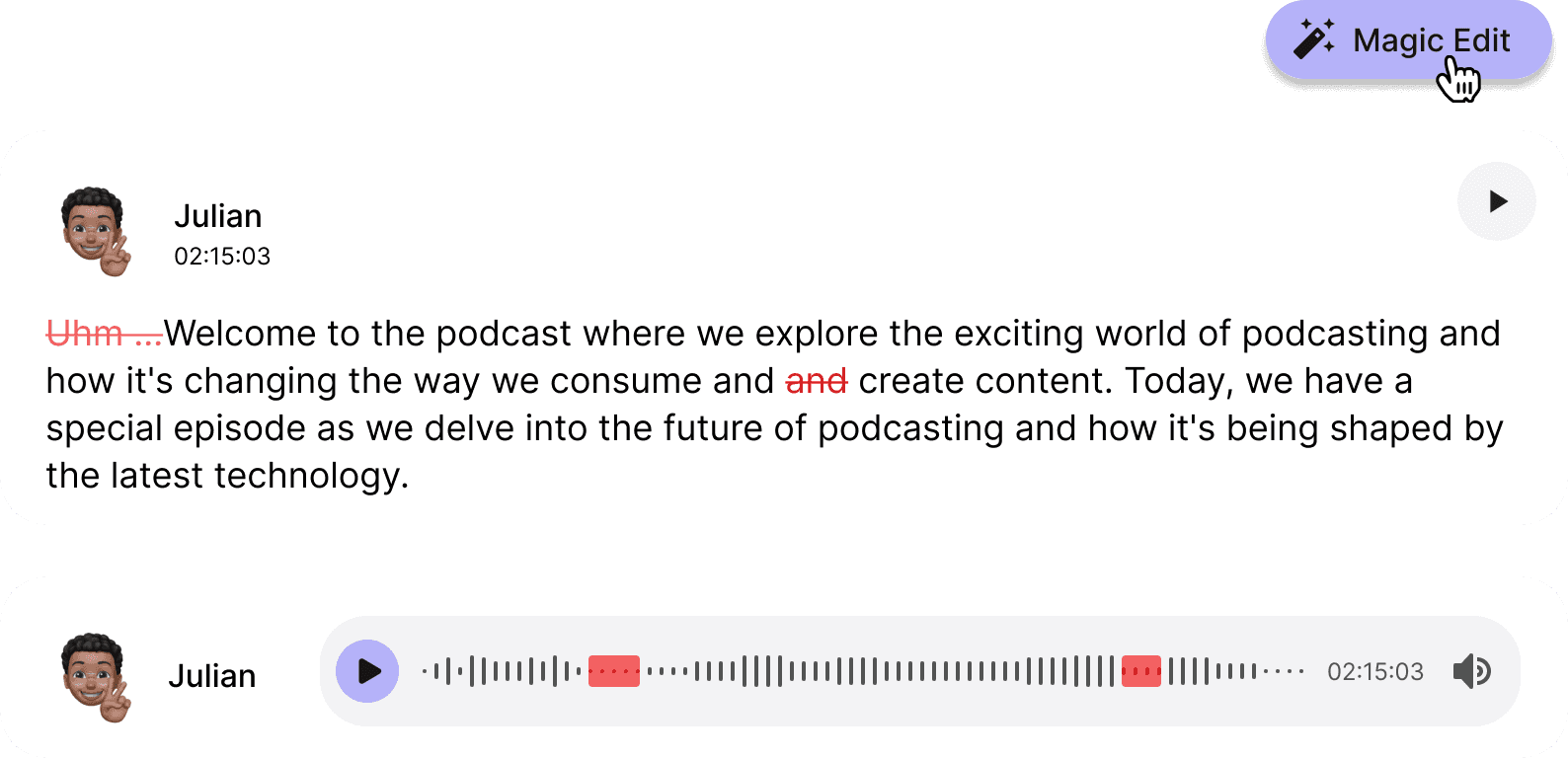
We can also use AI to transcribe the audio, providing a read of the audio that allows users to jump to specific sections without having to navigate confusing waveforms. It also has the added benefit of making it more accessible for users with hearing impairments.

We can go even further using AI it to enhance the audio quality. AI can help clear out background noise and enhance vocals, improving the overall audio quality of the recording. Additionally, AI can be used to filter out unnecessary words like "uhm" and suggest edits to improve the flow of the conversation.


These features not only save time for users, but also improve the quality of the final podcast product. By using AI, we can streamline the editing process and make it easier for users to create high-quality podcasts without the need for expensive editing tools or technical expertise.

Revamping the publish screen

Revamping the publish screen

Revamping the publish screen

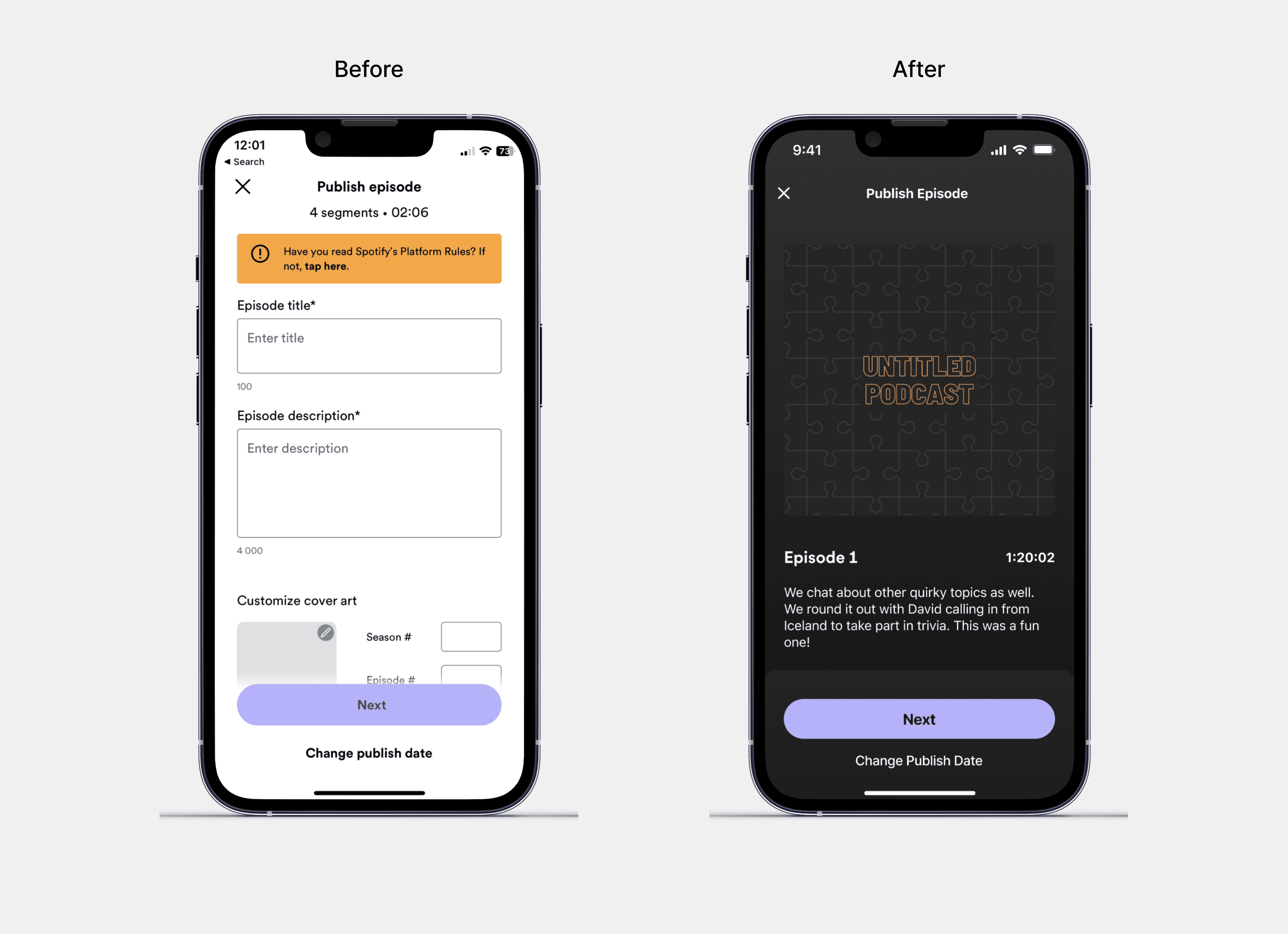
This screen now provides a real-time preview of what the final podcast would look like on the Spotify player. Rather than just a simple form, the publish screen now includes a visual representation of the final podcast page, complete with cover art, episode title, and a description of the episode. This preview helps users to visualize their podcast and make any necessary changes before publishing.

To take the publishing experience to the next level, we have introduced AI-powered features to generate cover art and title/description for the podcast. With this new feature, users can now generate cover art for their podcast without having to create it themselves. The AI can generate simple graphics or use the name of the podcast to create a logo.


Additionally, the AI can also listen to the podcast and generate a title and description for the episode based on its content. This feature saves time and effort for the user, as they no longer have to come up with a title and description themselves. It also ensures that the title and description are accurately representative of the episode's content.